Securing Accounts at Totus
Easy Incremental Approach
At Totus, we believe in making things simple, secure, and scalable without overwhelming you from the start. That's why our account security is designed to be incremental: begin with just an email and a secure login link for quick, passwordless access. Tame security layers like Hercules conquering Cerberus: start simple, scale up.
If you have never logged in to Totus before, that also counts as an account registration. No long forms, just the essentials.
That is good enough for many occasional users. They secure their Gmail or Proton account, keep their Totus balance low, and that is simple and easy - albeit not the most secure setup.
Other users cannot simply do that:
- They hold credit accounts with a few thousand dollars
- They run mission-critical systems at Totus
- They have a cybersecurity team enforcing them to use 2FA everywhere
The bottom line is you get to increase the level of protection gradually to your needs, at your own pace. From casual tester to core-business service dependency. For some accounts, when they reach certain volumes we do ask them to further secure their accounts, to reduce attack surface.
 Hercules Capturing Cerberus by Sebald Beham; Nuremberg, Germany (1545).
Methods to Authenticate
As usual with Totus, we keep it simple and classic:
- Passkeys (FIDO2, WebAuthn): the physical tokens (or password managed ones), the overall better password-less authentication.
- One-Time-Password: the classic six digits codes changing every few seconds, secure but less ideal.
- Backup-codes: one-time-use codes
- Password: the classic
Enrolling is Automatic
As soon as you add a second authentication, that is it, you have 2FA enabled. That's why we recommend you to set more than one. So you have: your email address, and two more methods, just in case you lose access to any one of them. In fact, if you are going to do it, do it all-in and create all of them, but that is up to you. In total, you can have five different methods, the four previously mentioned plus an email link. You need two working to log-in.
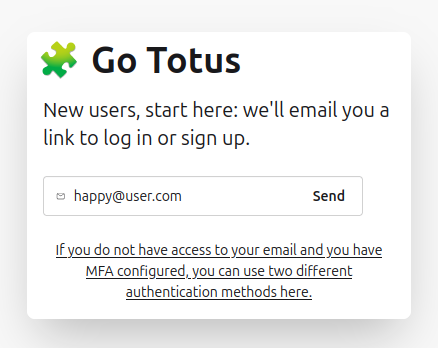
If you have lost access to your email, you can simply follow-up and use two different authentication methods.
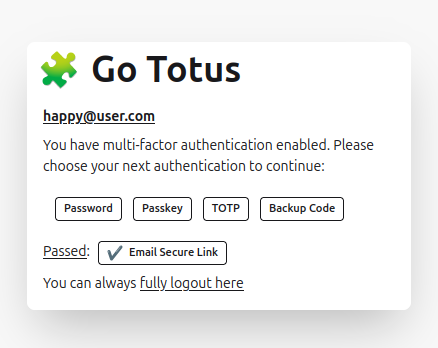
Following our motto of simplicity, you pick what 2FA you want to use. We've all been there, it asks for a security token, but you have your phone at hand with the OTP ... and you just want to use the OTP, quite common, quite annoyingly many platforms will not let you choose. Going to the crazy extend of blocking accounts, etc.
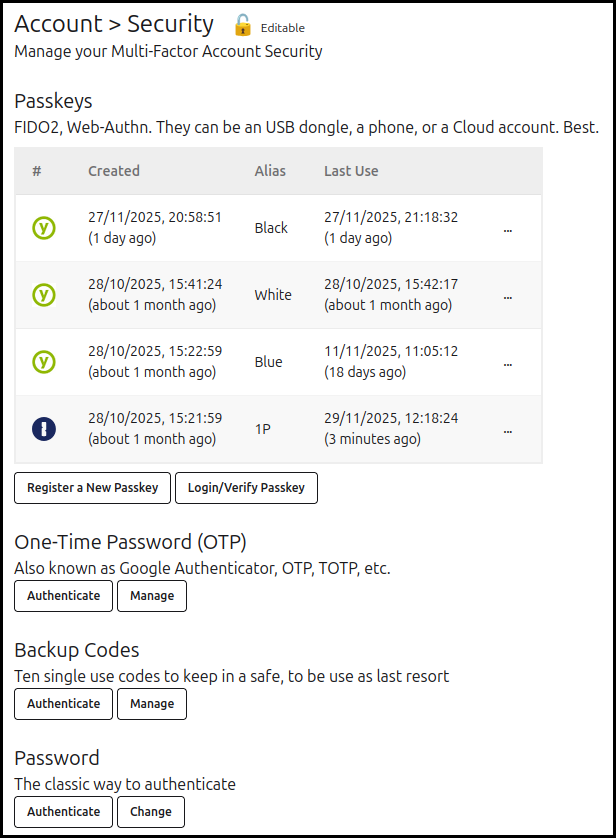
You can easily add multiple passkeys as is seen in the screenshot, to make it editable you just need to authenticate with any factor. Easy.
Session Management
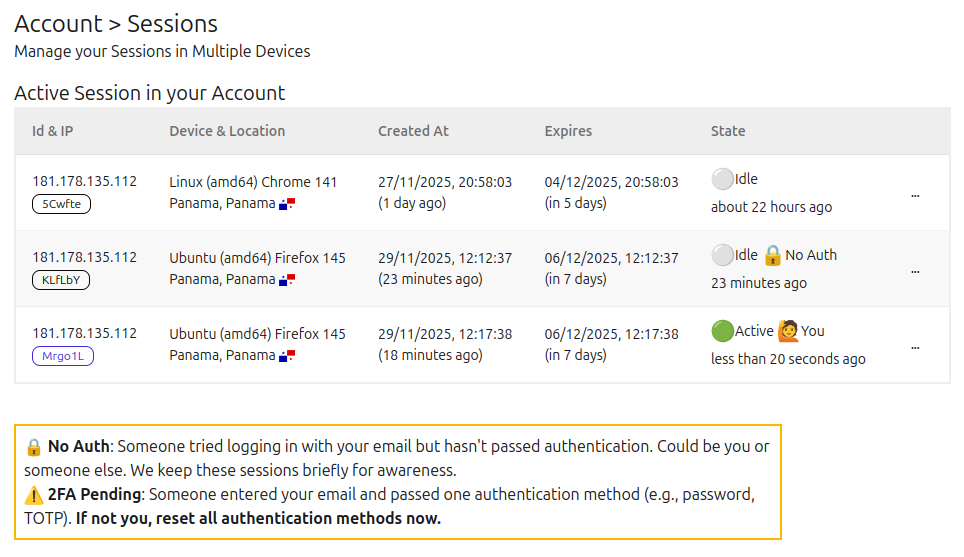
You can easily see which devices hold your authenticated sessions, if someone is halfway through, or begins a login attempt; you can also disconnect old sessions. Simple.